
How to use Sell Axe on DonutSMP 24/7 (with your PC off)
Updated July 2026 · 6 min read
To run Sell Axe on DonutSMP 24/7 with your PC off, connect your Minecraft account through afkclient.pro, join donutsmp.net, open the Automations tab, and enable the Sell Axe automation after you position the bot at your AFK pool or chest-breaking spot. The cloud client holds left click with your sell axe, keeps the loop healthy, and stays online overnight so you keep making money without leaving Minecraft open on your computer.
What is Sell Axe on DonutSMP?
Sell Axe is a DonutSMP money method where you hold a special sell axe and break chests (or farm in an AFK pool) so loot sells as you mine. Doing that by hand means babysitting left click for hours. afkclient.pro's Sell Axe automation aims the bot, holds left click in toggle mode, and can also auto-eat, unstick you from water, and buy a replacement axe from the auction house when yours breaks.
The automation only appears when you are connected to donutsmp.net. It requires the Standard plan or higher (or the free Pro trial, which includes Automations).
What you need before you start
- An afkclient.pro account (Discord login)
- A paid plan, or a claimed free 1-day Pro trial
- A Minecraft account linked with Microsoft
- A sell axe on that account (plus food / spare axes if you enable Auto Eat or Replenish)
- An AFK pool or chest setup you already placed the character in
Step-by-step: Sell Axe AFK on DonutSMP
1. Sign up to afkclient.pro
Open afkclient.pro/login and sign in with Discord. That creates your dashboard account. No Minecraft download is required - the client runs in the browser and hosts your bot in the cloud.
2. Purchase a plan, or claim the free trial
Automations (including Sell Axe) need Standard or Pro. If you have not subscribed yet, either pick a plan on Pricing or claim the free 1-day Pro trial (Discord membership required, no credit card). Once access is active, you can connect accounts and open Automations.
3. Add your first Minecraft account
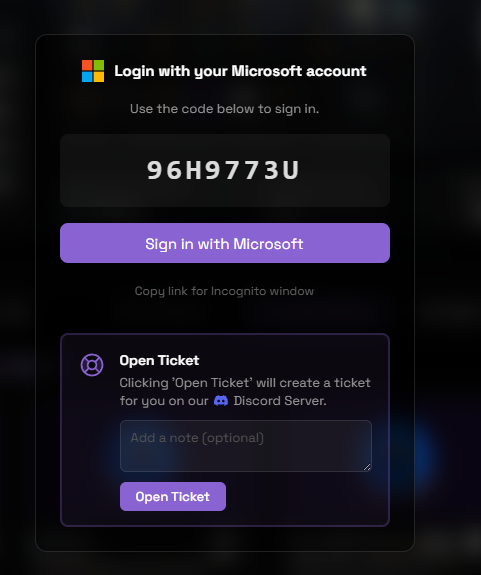
In the dashboard, add an account and complete Microsoft login. You will get a short device code and a Sign in with Microsoft button. Enter the code on Microsoft's page - your password goes to Microsoft, never to afkclient.pro.
4. Connect the account to DonutSMP
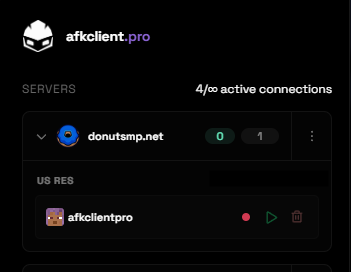
Add the server donutsmp.net (or select it if it is already listed), then press the green play button on your account. afkclient.pro detects the Minecraft version automatically. Wait until the account shows as online before moving on.
5. Open the Automations tab
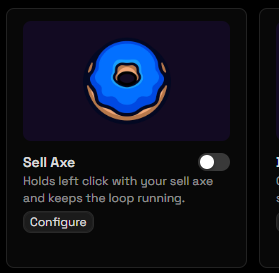
Select the connected DonutSMP account, then open the Automations tab in the account workspace. You should see DonutSMP-specific cards, including Sell Axe.
6. Click Configure on Sell Axe
On the Sell Axe card, click Configure before flipping the toggle on. Set look direction, stuck detection, auto eat, and axe replenish to match your farm.
Useful options:
- Look Direction - aim up, down, or a cardinal direction so left click hits the chests or blocks you want. Use "Keep current look" if you already aimed in-game.
- Detect Bot Stuck - if the bot stops moving anywhere (washed into water, wedged in a corner, frozen), nudge in all four directions, reconnect, or send a command like
/spawn. - Auto Eat - pause the hold, eat from offhand or inventory when hunger is low, then resume.
- Automatically Replenish Axe - when the axe breaks, equip a spare or buy one from
/ahinside your min/max price (millions), confirm the green pane, and keep chopping.
7. Position the bot, then reconnect through the client
Before you enable Sell Axe, put the character exactly where you want it to break chests or AFK in the pool. The safest sequence:
- Join DonutSMP on a normal Minecraft client (or use afkclient.pro's viewer/controls) and walk into your AFK pool or chest line.
- Face the direction you want the axe to hit, or plan to set Look Direction in Configure.
- Log the account off in-game (quit to title / disconnect) so only one session owns the account.
- Connect again from afkclient.pro so the cloud session owns the connection at that spot.
- Confirm you still have the sell axe selected (or in hotbar), then enable the Sell Axe automation.
Enabling the automation before you are in position wastes the axe on the wrong blocks. Reconnecting after a local client session also avoids session conflicts.
8. Leave it running 24/7
Once Sell Axe is on and the hold is active, you can close the browser tab and shut down your PC. The bot stays on DonutSMP from the cloud, keeps nearby chunks loaded, and continues the sell-axe loop until you turn the automation off or disconnect the account.
Recommended settings for overnight Sell Axe
- Turn on Auto Eat and keep food in offhand or inventory.
- Turn on Automatically Replenish Axe with a realistic AH price range for sell axes on your economy.
- Enable Detect Bot Stuck if your setup uses water streams or the bot can get wedged - it triggers on any stretch of no movement, not just water.
- Set Look Direction to the face of the chests (often Down or a fixed cardinal), not "current," unless you verified the aim after reconnect.
Can I run Sell Axe with my PC completely off?
Yes. afkclient.pro hosts the Minecraft connection on its servers. After the bot is connected and Sell Axe is enabled, your computer's power state does not matter. That is the same cloud AFK model described in the AFK with your PC off guide.
Is Sell Axe AFK allowed on DonutSMP?
AFK play and farming methods are common on DonutSMP, but server rules and automation policies can change. Check the current DonutSMP rules and Discord before running any AFK or automation tool, and use features like anti-AFK-kick within normal limits. afkclient.pro is not affiliated with DonutSMP.
Run Sell Axe on DonutSMP overnight
Start free with the Pro trial, or subscribe and set up Sell Axe in a few minutes.
Start Free TrialFAQ
/spawn.